
Close a Deal
In ZoriCRM, a deal is considered closed when you move it to a final outcome. This records the result of the sales process and feeds into your analytics.
Where to close a deal
Open the deal and find the pipeline stage bar at the top of the card. The last item in the bar is the Closed stage.
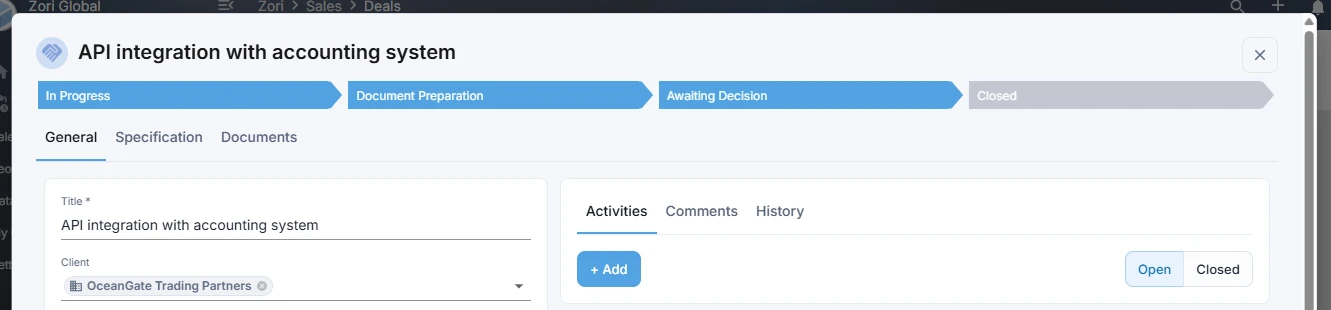
Click Closed - the system will ask you to choose an outcome:
- Successfully completed
- Cancelled
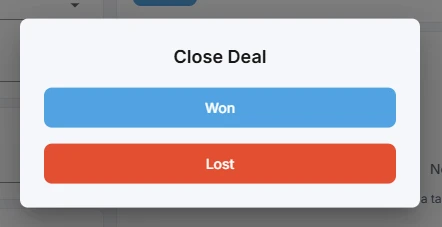
After selecting, the deal moves to the corresponding final stage.
What happens after closing
- The deal remains fully accessible - with all its documents, comments, and history.
- The chosen outcome (e.g., Successfully completed or Cancelled) is displayed on the deal card and in the deals list.
Analytics for closed deals
Closed deal outcomes and stage history feed into the summary analytics on the Dashboard.
This gives you a clear picture of your sales performance - for example:
- total value of won deals
- time spent in each stage
- deal velocity
- stages where deals are most often lost